.svg)


.png?width=20&height=20&name=Vector%20(1).png)


.svg)


Most manufacturers are tracking quality in some form. The tests are defined, the limits are set, and results are being recorded. But what is often missing is the connection between what went into the machine and what came out of it. Recipe data shows how a process was supposed to run. Quality data shows whether the output met expectations. Together, they give manufacturers a clearer path to consistency, traceability, and continuous improvement.
What recipe data includes
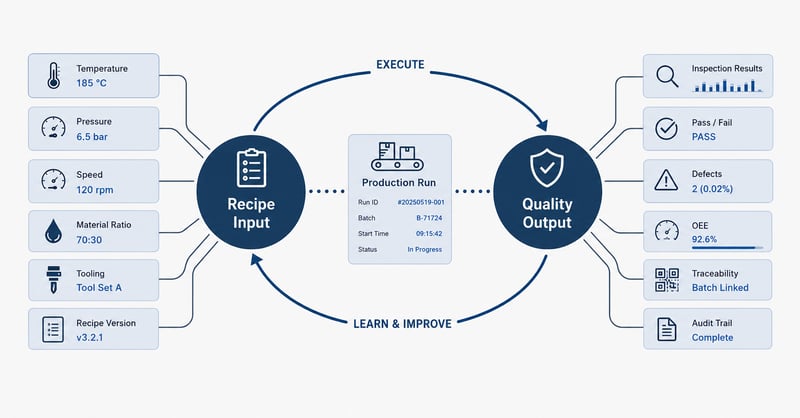
Recipe data captures everything that defines how a job is set up before a run begins. That typically includes:
- Process setpoints: temperature, pressure, speed
- Timing parameters and material ratios
- Tooling specifications
- Recipe version history
That last item matters more than people expect. Recipes change over time, and if you're not tracking versions, you lose visibility into what actually ran on a given day. Machines also age, and a setpoint that was correct at commissioning may no longer produce the same result years later.
What quality tracking can include
Quality data covers the output side of the equation. Depending on the product and industry, that can mean:
- Dimensional inspection results
- Visual or functional checks
- Pass/fail data by unit or batch
- Defect codes and classifications
- Customer-specific acceptance criteria
On its own, quality data tells you whether what you produced was acceptable. What it doesn't tell you is why.
How recipe and quality data gets captured
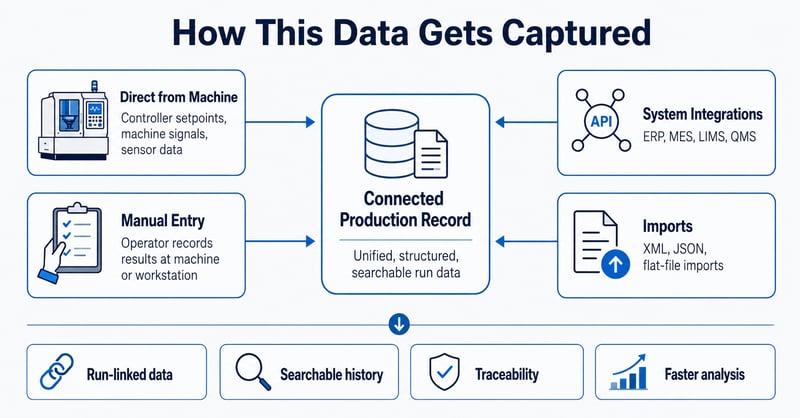
There is no single right method for capturing recipe and quality data. The approach depends on the customer’s equipment, existing systems, controller types, and stage of digitization.
Common capture methods include:
- Direct machine data: Controllers already hold setpoints, and inspection equipment with digital outputs can feed quality results automatically.
- Manual entry: Operators record results at the machine or a workstation, making the data structured and searchable even when full automation is not available.
- System integrations: API connections, XML and JSON exchanges, and flat-file imports can connect to ERP, MES, lab systems, or other existing platforms.
- Batch imports: Customers who are not ready for live integrations can still upload structured data for analysis.
The age of the machine often drives the decision. A newer machine may expose data over OPC UA, while an older one may need a hardware collector to bridge the gap. Some settings may only be changed manually. Some facilities already have ERP or MES systems doing part of the job. The goal is not to force one model, but to connect what already exists in a way that fits the customer’s environment.
Connecting recipe settings to quality results
Capturing these two data sets separately isn't enough. The value is in linking them - tying a specific recipe version and its settings to a specific batch, run, lot, or product.
When that linkage exists, a quality failure becomes a question you can actually investigate:
- What were the settings when this happened?
- What version of the recipe was active?
- Was anything adjusted mid-run?
Without that connection, quality is examined in isolation. Failures get tracked diligently, but teams don't know how to reduce them because they can't see what drove them.
This is where connected Recipe and Quality applications become valuable. Recipe data provides the context for how a run was intended to execute, while quality data shows whether the result met expectations. When both are tied to the same run, batch, lot, or order, manufacturers can move from isolated records to a connected production history.
The closed loop: execute, learn, improve
The real value is not just capturing recipe and quality data side by side. It is creating a feedback loop between them. It works like this:
-
You load a recipe and execute a run.
-
You collect quality results during and after that run.
-
You use those results to evaluate whether the starting conditions were correct.
-
Then you feed that learning back into the recipe before the next run begins.
Each cycle makes the next one better. The recipe becomes a living document rather than a fixed artifact from the last time someone ran a qualification trial.
Most manufacturers are doing the first part. They set up the machine and run the job. Far fewer are completing the loop, using what they learn from quality outcomes to actively refine the inputs. That gap is where inconsistency lives, and where the most improvement is available.
Using history to find the best-performing conditions
Once connected recipe and quality data has been collected over time, you have something genuinely useful: a searchable history of your own process under real production conditions.
That history lets you compare runs and identify what was present when the product ran well versus when it didn't. The goal is finding the actual optimal settings for your process today, not the settings defined during initial qualification years ago, which may no longer reflect how the machine and materials actually behave.
This kind of analysis can be done manually, but it's time-consuming. If a recipe has run 20 times in a year, someone has to pull all of that data and look for patterns. Systems that automate this analysis, or AI-assisted tools that surface patterns across large run histories, can significantly reduce the time required to identify where process improvements may be hiding.
A real example: when the recipe said one thing and the machine did another
One situation I've seen play out more than once involves a manufacturer running the same recipe repeatedly with inconsistent results. Some runs produce at 95% OEE. Others fall short: lots of failures, bad material, no obvious explanation.
What we found when we looked at the recipe history was that one experienced operator was consistently making small adjustments before and during his runs. He had been running machines for years and knew the equipment well. He understood, for instance, that entering the temperature the recipe called for wouldn't get the machine to the right temperature. The equipment had aged. The relationship between the setpoint and the actual output had drifted. So he compensated.
He never documented those changes. He just knew.
When we pulled the change logs, the pattern was clear. Every time he ran the machine, results were strong. Every time it ran on the original settings, it wasn't. We interviewed him, confirmed what he was doing, and used that information to update the base recipe.
From tracking to improving
Connecting recipe and quality data into a shared history supports several things that are otherwise difficult to achieve:
- Faster troubleshooting: When a product fails, there's a searchable record of what was happening on the machine before and during the failure.
- Better consistency: The recipe defines the target. The system captures what actually ran. The gap between the two becomes visible.
- Real traceability: For customers who need proof of compliance, a certificate of analysis, a production record, an audit trail, the data is already captured and associated with the right order or batch.
- Continuous improvement you can act on: You have the data to make informed changes, and a way to measure whether those changes worked.
Most manufacturers already have part of this in place. Bringing it together, and making it searchable across runs, is where the value compounds.
ABOUT THE AUTHOR
Chad Ifill is an Enterprise Account Director at ei3 with over 25 years of experience across customer support, technical service, and enterprise sales. Having started on ei3’s Help Desk providing 24/7 customer support, Chad has worked in multiple customer-focused roles and is known for his strong technical understanding, long-standing customer relationships, and hands-on experience supporting machine connectivity and monitoring initiatives.

Chad Ifill
Connect with me on Linkedin
Discover how manufacturers are using IIoT
Get the ei3 Guide that looks at four practical ways for machine owners to get value out of IIoT deployments.





.svg)
.svg)
.svg)